
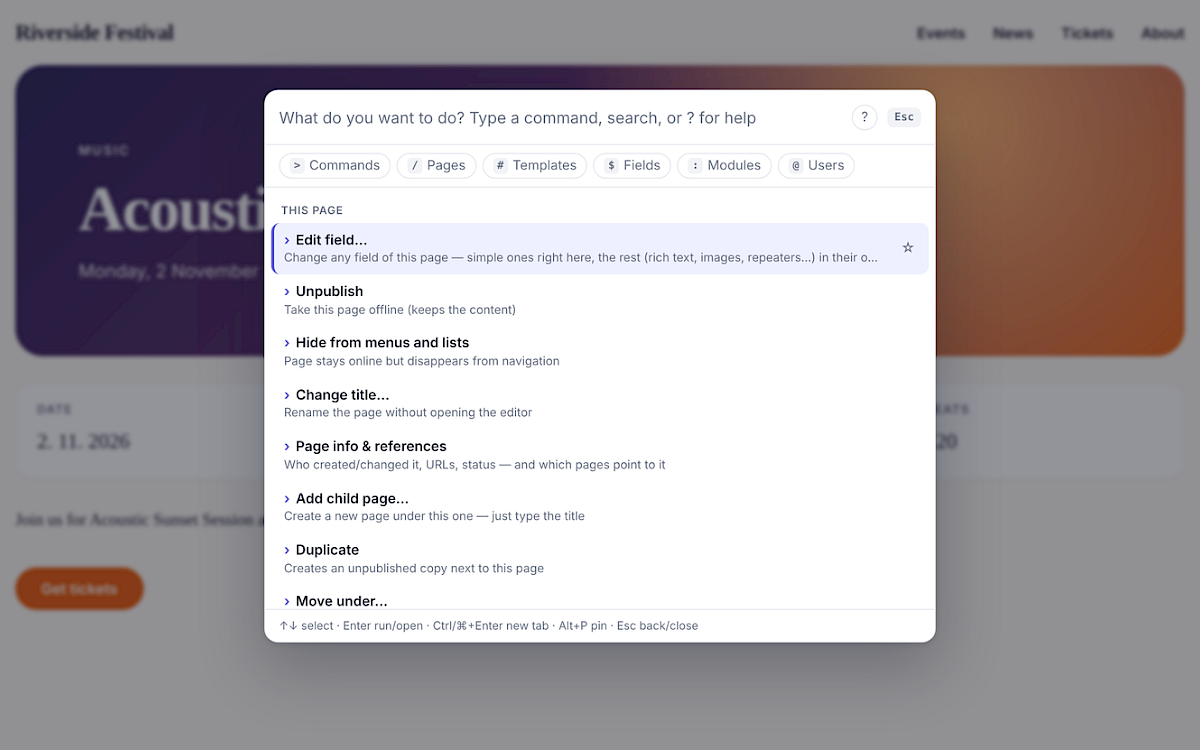
What you get
- Act on the page you're looking at
- On the front-end (for logged-in editors) or on the page open in the admin editor:
- Edit field… — any field.
- Simple fields are edited right in the palette: text, number, price (12,50 works), date (5.11.2026 18:00, next friday 19:30), checkbox, toggle, Options and Page reference (every setup: parent, template, selector incl. page. context, custom code or “any page”). The current value is pre-filled, only valid choices are offered, multi-language fields can be set per language.
- Everything else — rich text, images, files, repeaters, Repeater Matrix, Combo, Table, map, third-party fields, and multi-line text — opens ProcessWire's own editor in a modal, showing just that field. Full toolbar, uploads and validation; the page refreshes after saving.
- Publish / Unpublish (publishing is refused while required fields are empty, like in the page editor), Hide / Show in menus
- Change title…, Add child page…, Duplicate, Move under…, Move to trash
- Page info & references — ID, template, status, URLs in every language, created/modified by whom, and which pages reference or link to it. Move and Trash warn you about it.
- Every change made through the palette (fields, title, status, move, trash, duplicate, new page, whole bulk batches) can be undone: from the toast after the page reloads, from the result screen, or with the Undo command. The last 10 changes are kept per user session; permissions are checked again when undoing.
Details
Press Alt+K (Option+K on Mac — or any shortcut you like) on any page of your site and act on it right there: edit any field, publish, rename, duplicate, move or trash it — and undo any of it. Bulk-edit hundreds of pages with a selector, see who points to a page before you delete it, and jump to any page, template, field, module or user in two keystrokes.
Think Spotlight / Raycast or the VS Code command palette — for your ProcessWire site. Works with any site profile, any templates and any fields. No dependencies.
Why you'd want it
| You want to… | Usually | With Native Command |
|---|---|---|
| Fix a typo you just spotted on the live site | admin → find the page → edit → save → back | Alt+K · title · type · Enter |
| Move an event to next Friday | admin → page → date field → datepicker → save | Alt+K · edit · date · next friday 19:30 |
| Unpublish all events that already happened | open each one, uncheck, save — ×20 | bulk unpublish · template=event, date<today · Enter |
| Know whether a page is used before deleting it | — | Alt+K · info |
| Undo a mistake | — | click Undo |
| Get to a page / template / field / module / user | menus, search screen | Alt+K · type · Enter |
It doesn't replace the page editor — it's for the hundreds of small things that don't deserve five screens.
You may also like
NativeForum
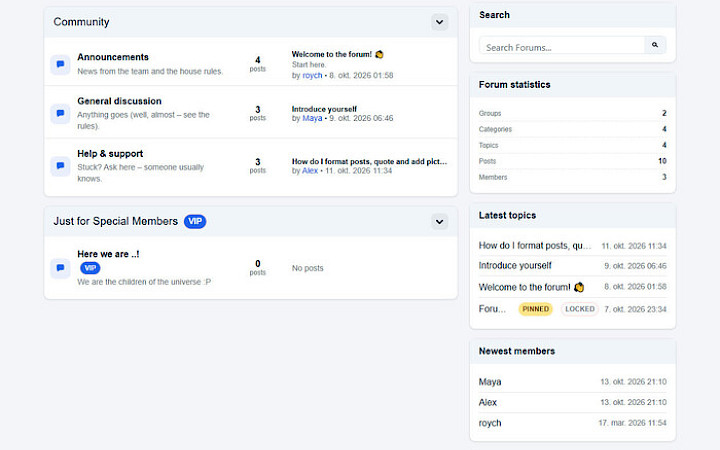
A complete, self-contained community forum for ProcessWire CMS/CMF: groups, categories, topics, replies, private messages, following, moderation, anti-spam, SEO/GEO and ready-made designs. It runs inside your existing site layout, so your header, menus, footer and scripts keep working.
FreeDetails

AI Visibility
Get your catalog ready for ChatGPT, Claude, Perplexity, Gemini and other AI assistants. Audit product data, generate multilingual AI content and FAQ, automate fixes in safe batches, and measure AI crawler visits and AI referrals, all from your Presta
€125.99Details